
TimeClock Plus Clock
TimeClock Plus, LLCBusiness
4.9411.00 Reviews
- Version
- 1.43.0
- Installs
- 100.00K
- Age Rating
- Everyone
Screenshots
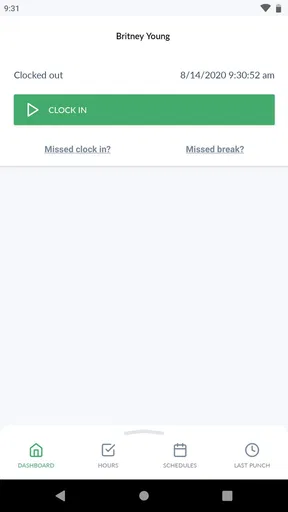
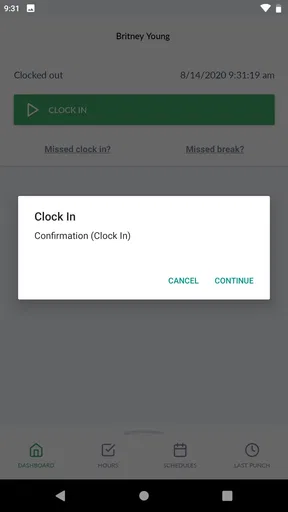
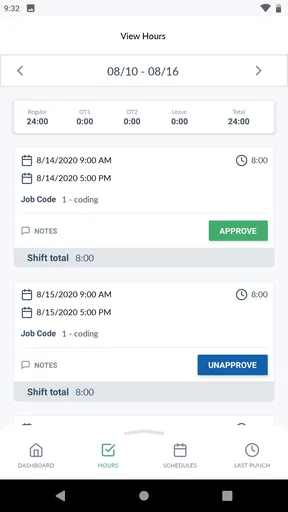
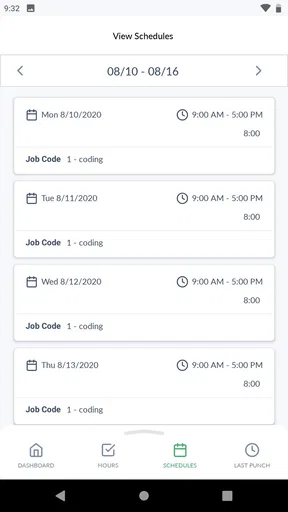
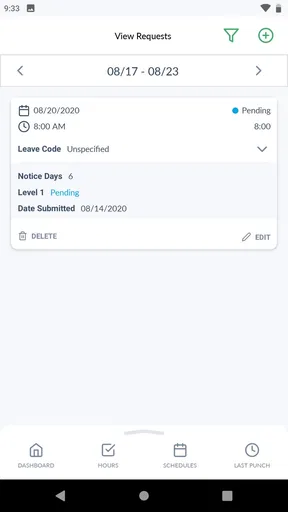
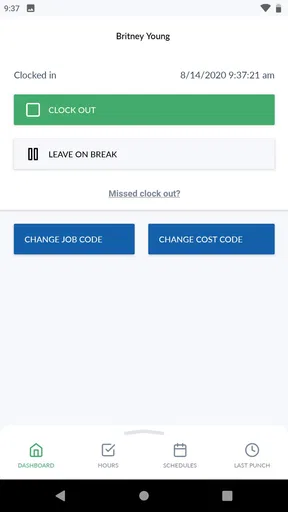
Our Review of TimeClock Plus Clock
 Analysis by Appyee
I spent time with TimeClock Plus Clock as a practical work tool rather than treating it like another generic business download. Its purpose is straightforward: help team members record working time while they are away from a desk. That focus is also the reason I found it easier to judge than many broader workplace apps. It is not trying to be a full project manager, chat platform, or accounting package. It is a focused mobile time-tracking app from TimeClock Plus, LLC, aimed at organizations that need a clearer record of when people work.
My first impression was that the app makes the most sense when a team already has a timekeeping process and wants to make the employee side more convenient. The store summary describes easy, accurate tracking for teams on the go, and that is a fair way to understand its role. The important word for me is “team”: this is more useful when several people follow the same workplace rules than when one person simply wants a private stopwatch.
It is free to download and carries an Everyone age rating, which removes two common barriers for a mixed workplace. It has also built a strong audience, with an average rating of 4.9 from roughly 4.6 thousand ratings and more than 100 thousand installs. Those figures do not replace hands-on judgment, but they do suggest that the basic workflow is meeting a real need for many users.
How the current app fits into a working day
I judge a mobile time clock by whether it makes the next shift change less awkward, not by how many options it offers. For teams already using TimeClock Plus Clock, the useful question is how naturally it fits the routine employees follow before and after work. I’d also look at who handles exceptions, since that small decision often determines whether mobile timekeeping saves effort or simply moves confusion onto a phone.
A focused tool for mobile teams
The clearest use case is a worker who starts, ends, or manages a shift away from a traditional office computer. Think of a technician moving between appointments, a retail employee beginning a shift on the shop floor, or a field worker who does not want to return to a shared terminal just to record time. In those situations, a phone-based clock can remove a small but repeated inconvenience.
I also see value for supervisors who need staff to follow one consistent routine. A shared mobile process is easier to explain than a mixture of handwritten notes, text messages, and end-of-week memory. The app does not need to replace every administrative system to be useful; it can serve as the point where employees record their working time, while managers handle broader payroll or scheduling work elsewhere.
That distinction matters. Someone looking for a personal productivity timer may find this app more structured than necessary. A freelancer tracking billable minutes across several clients may prefer a project timer with labels, notes, and invoicing tools. TimeClock Plus Clock is better suited to an employer-defined timekeeping environment than to casual personal tracking.
What I would check before asking a whole team to use it
Before introducing it across a workplace, I would test the exact routine employees are expected to follow. Have a few people use it at the beginning and end of a normal shift, then ask them to repeat the process after moving between locations or dealing with a weak connection. The goal is not simply to see whether the app opens. It is to confirm that the organization’s clock-in habits, approval process, and correction procedure fit the mobile experience.
This is one of the less obvious trade-offs with a business time app: a clean employee screen cannot fix unclear workplace rules. If staff do not know whether to record a break immediately, how to handle a missed clock event, or whom to contact when something looks wrong, the app may expose confusion rather than solve it. I would document those rules before rollout and give employees one simple escalation path.
Another useful preparation step is to choose a small pilot group rather than switching everyone at once. Include someone who works at a fixed site and someone who spends most of the day moving around. Their experiences will reveal different friction points. A system that feels effortless at a desk may feel less convenient when a worker is carrying equipment, wearing gloves, or trying to finish a shift quickly.
Where it compares well with familiar alternatives
The usual alternatives are paper timesheets, a shared clock terminal, messages to a supervisor, spreadsheets, or a broader workforce platform. Compared with paper, a mobile clock is more immediate and avoids the end-of-week task of reconstructing hours from memory. Compared with messages, it gives the team a defined action instead of asking a manager to interpret informal updates.
Compared with a shared terminal, the advantage is flexibility. Employees do not all have to pass through one physical point, which is especially helpful for distributed or field-based teams. The trade-off is that a phone-based process depends more on disciplined use: the employee must remember to perform the action on the correct device and at the correct moment.
A spreadsheet remains attractive for a very small team because it is familiar and adaptable. However, spreadsheets can become awkward when several people edit them, when entries need checking, or when a manager has to chase missing information. TimeClock Plus Clock is the more natural choice when the organization wants a dedicated timekeeping habit rather than a document that happens to contain hours.
A larger workforce suite may be better for companies that need scheduling, payroll, leave management, reporting, and time capture in one connected environment. I would not choose this app solely because it is free if the real requirement is a complete human-resources system. The right question is whether the organization needs a mobile clocking experience or an entire administrative platform.
The practical workflow I found most sensible
For everyday use, I would keep the workflow deliberately boring. Open the app before the shift begins, complete the required time action, and make it part of the same routine as putting on a uniform or collecting work equipment. At the end of the shift, repeat the action before leaving the work context. That habit is more reliable than depending on a later reminder.
For supervisors, I would set a short daily review window rather than waiting until payroll preparation. A missed entry is easier to resolve while the employee remembers what happened. This is a concrete advantage of treating the app as part of a process instead of merely installing it and assuming the records will take care of themselves.
One useful insight is that mobile timekeeping works best when the organization separates “recording time” from “explaining exceptions.” The app can support the clocking routine, but a missed punch, an early departure, or an unusual shift still needs a clear human review process. Keeping those two responsibilities distinct reduces the temptation to make employees add unnecessary explanations every time they use the clock.
How the product has developed
The app was released on October 21, 2020, and its current version is 1.43.0. That version history gives the product a more established feel than a brand-new experiment. I would interpret the progression as evidence of ongoing maintenance and refinement, not as proof that every organization-specific request has been addressed.
For an existing user, an updated version is most valuable when it makes routine actions more dependable or easier to understand. Small changes in a time clock can matter more than flashy additions because employees repeat the same action many times. A clearer control, a smoother return to the clock screen, or more predictable handling of a normal workday can reduce support questions across an entire team.
At the same time, I would avoid assuming that a version number alone means a major redesign. Product evolution in this category is often incremental. The sensible approach is to check the current workflow after updating, especially if the app is used in a payroll-sensitive process. Managers should make sure that employees know what has changed before the next busy shift, while workers should report confusing behavior immediately rather than quietly inventing a workaround.
The minimum operating-system requirement is Android 7.0, which keeps the app accessible to many older Android devices. That can be important for employers that provide budget phones or allow staff to use existing hardware. Still, compatibility is only the first check. An older phone may have a smaller screen, slower performance, or aggressive battery management that affects the experience. I would test the actual devices used by the team instead of relying only on the operating-system requirement.
What the current release means for existing users
If I were already using the app, I would treat the current release as a reason to review habits, not to change them blindly. First, I would ask employees whether the clocking action is easy to find during a rushed shift change. Second, I would compare the number of corrections or questions before and after the update. Third, I would confirm that supervisors still know how to handle exceptions.
This approach catches a problem that is easy to miss: an app can be technically updated while the surrounding workplace instructions remain outdated. For example, a team may continue following an old verbal routine even though the current version presents the process differently. A short refresher message and a trial shift can prevent that mismatch from becoming a payroll headache.
I would also avoid updating every device during the busiest part of the workday. Even a routine app update deserves a controlled moment when someone is available to help. This is not a criticism specific to TimeClock Plus Clock; it is simply good practice for any tool that records attendance or working hours. The more important the record, the less sensible it is to make a change without a quick verification.
For employees, the main benefit of a mature mobile clock is consistency. You know which app to open and which routine to follow instead of relying on memory or a supervisor’s availability. For managers, the benefit is a more organized starting point for reviewing time. Neither benefit is automatic, though. The organization still needs clear policies, and users still need to complete the action at the right time.
Limitations that should influence your decision
The largest limitation is scope. This is a time clock, not a universal work-management solution. If your main need is detailed task timing, client billing, project budgets, or personal productivity analytics, a specialized timer may give you more useful information. Installing this app will not automatically create a complete picture of how a person spends every minute.
There is also a human reliability issue. Mobile access makes clocking more convenient, but convenience can work both ways: an employee may forget the action while moving between tasks, or may postpone it until later. That is why I would pair the app with a clear routine and a simple correction process. The technology is most valuable when it reduces friction without encouraging people to treat time records casually.
Older hardware is another consideration. The Android 7.0 minimum makes the app approachable for devices that are no longer new, but an organization should still test screen readability and responsiveness. A worker who struggles to complete a clock action on an aging phone is more likely to delay it. In a field environment, the physical reality of the device can matter as much as the software.
I would also be cautious about choosing it for a company that expects one app to handle every workforce function. If your decision depends on advanced scheduling, complex approval chains, comprehensive payroll connections, or extensive reporting, evaluate the full administrative setup rather than judging the clock alone. The app may be a good mobile component while still being insufficient as the only business system.
Privacy and workplace expectations deserve a conversation before deployment as well. Employees should understand what the organization expects them to record and when. Managers should avoid turning a simple timekeeping tool into a vague monitoring practice. Clear boundaries make adoption easier because people know the purpose of the app and how the records will be used.
Who should use it, and who should look elsewhere?
I would recommend TimeClock Plus Clock to teams that need a dedicated way for employees to record work time while away from a shared office terminal. It is especially sensible for organizations with repeatable shifts, mobile staff, or a mixture of fixed and off-site work. The free price also makes it easy to evaluate without adding a purchase decision to the first trial.
I would be more hesitant for a solo user who only wants to measure personal focus. That person may find a simpler timer faster and more informative. I would also look at a broader workforce platform for a company that wants scheduling, leave, payroll, and detailed reporting tightly joined together. This app is strongest when its job is clearly defined.
For a small business, I would start by writing down the clock-in, break, clock-out, and correction rules in plain language. Then I would test the app with a few employees across different work settings. If the process feels natural and the manager can resolve exceptions without confusion, the app is a promising fit. If the pilot reveals that the team needs extensive project tracking or complex approvals, that is a sign to compare more comprehensive alternatives.
What I would watch next
When judging future updates, I would pay attention to changes that affect trust and daily effort rather than simply counting new options. Does the app make the normal clocking routine clearer? Does it help users recover gracefully from a missed action? Does it remain comfortable on the range of phones a real employer uses? Those questions matter more to me than a long feature list.
I would also watch how well the product continues to serve both sides of the relationship. Employees need a quick, understandable action. Supervisors need records they can review without turning every small issue into a manual investigation. Improvements that help one side while adding confusion for the other would not represent meaningful progress.
My practical advice is to keep a short change log inside the organization. Whenever the app is updated, note what employees should do differently, if anything, and ask for feedback after several normal shifts. This creates a useful record of product evolution without relying on vague impressions. It also helps distinguish a genuine improvement from a temporary learning curve.
After using it as a focused business tool, I see TimeClock Plus Clock as a sensible choice for teams that want mobile time capture without pretending it is an entire company-management suite. Its established release history, broad Android compatibility, free availability, and strong user response make it easy to justify a careful trial. The real test is the surrounding workflow: clear rules, suitable devices, and someone responsible for resolving exceptions.
My recommendation is to try it when reliable shift recording is the main problem you want to solve. I would not choose it as a replacement for project billing or a full workforce platform, but I would consider it for a team that needs a consistent clocking habit on the move. Used with sensible workplace instructions, TimeClock Plus Clock can remove the paper trail and memory gaps that make everyday timekeeping harder than it needs to be.
Verdict
Strengths of TimeClock Plus Clock
- Simple clock-in and clock-out process for daily time tracking.
- Supports location-based verification for added attendance control.
- Employees can review their recorded hours from the mobile app.
- Useful for organizations managing multiple teams or work locations.
- Syncs time entries with the employer’s TimeClock Plus system.
Limitations of TimeClock Plus Clock
- Most features require an active employer account and organization setup.
- Location permissions may raise privacy concerns for some employees.
- App usefulness is limited if your workplace uses another timekeeping platform.
- Occasional login or synchronization issues can delay time entry updates.
- Some advanced functions may depend on your company’s subscription plan.
Similar Picks in This Category
View All
LinkedIn: Community & Network
LinkedIn3.8

Zoom Workplace
zoom.com4.1

Microsoft Teams
Microsoft Corporation4.6

Meta Business Suite
Meta Platforms, Inc.4.6

Webex Meetings
Cisco Systems, Inc.4.5

TeamViewer Remote Control
TeamViewer4.4
Frequently Asked Questions
What is TimeClock Plus Clock used for?
TimeClock Plus Clock is a workforce time-tracking application designed to let employees clock in and out, review work hours, and manage attendance from a mobile device. Depending on the organization’s setup, it may also support breaks, job or department selection, schedules, time-off requests, and timesheet review. The exact tools available can vary according to the employer’s TimeClock Plus configuration and user permissions.
How do I log in to TimeClock Plus Clock?
To use the app, you generally need an account provided or activated by your employer. Login details may include a username, password, company code, or organization-specific server information. Some workplaces may enable single sign-on or additional verification. If your credentials do not work, the issue is usually related to account permissions, an incorrect organization selection, or an employer-managed password rather than the app installation itself.
Does TimeClock Plus Clock track my location?
Location tracking depends on the settings selected by your employer and the permissions granted on your Android or iOS device. Some organizations use location services or geofencing to confirm that employees are clocking in from an approved workplace. The app may request access to location, notifications, or other device features. Before using it, review the organization’s workplace privacy policy and your device permission settings.
Can I use TimeClock Plus Clock without an internet connection?
The app’s ability to work offline depends on the version, account configuration, and clocking rules established by your organization. Certain actions may require an active internet or mobile data connection so that punches can be verified and synchronized with the employer’s system. If connectivity is interrupted, a punch may be delayed, restricted, or handled according to company policy, so confirm the offline procedure with your manager.
What should I do if a clock-in or clock-out is missing?
If a punch does not appear correctly, first check your connection, refresh the timesheet, and confirm that you are viewing the correct work period. Avoid repeatedly submitting the same punch, as this could create duplicates. Time corrections are commonly controlled by supervisors or payroll administrators, so contact the appropriate person promptly and provide the date, approximate time, location, and details of the missing or incorrect entry.
